AI storyboard continuity involves both stable identities and connected actions. Review adjacent shots and the cut between them. An attractive still cannot establish whether a sequence works in motion.
An attractive image can take over the discussion when making AI storyboards. In an edit, other problems appear: the person changes position, an object switches hands, or an action starts again after it has already ended.
I start by looking at the cut between neighbouring shots. Style can be adjusted; the action needs to make sense first.
Start and end
Imagine a person leaving a room. “Walks to the door” still leaves a lot open. Where do they begin and end? Are they holding anything? Which side of the frame will they leave?
Here is a fictional sequence:
| Shot | Start | End |
|---|---|---|
| S01 | The person stands inside, holding a cup in the right hand | Looks outside, with the cup still in the right hand |
| S02 | Continues the previous eyeline | Turns and walks towards frame right |
| S03 | Enters from frame left | Walks outside, keeping the cup in the same hand |
The fictional sequence establishes what should stay consistent when preparing references and prompts.
Watch the cuts
I play two or three shots together, then stop near the cut. Position, eyelines, clothes, objects and the direction of light can all affect continuity.
Every change is not necessarily an error. A new location, a time jump or an intentional omission will change the image. The question is whether the action remains understandable and whether the change belongs to the story.
Write down a specific problem. “Not good enough” is difficult to fix. “The cup changes hands at the cut” gives someone a place to look.
A viewing exercise
Try this with Wild Ride, an AI concept film. Choose an actual cut and compare the rider, helmet, motorcycle shape and screen direction on either side. Then play it again without stopping.
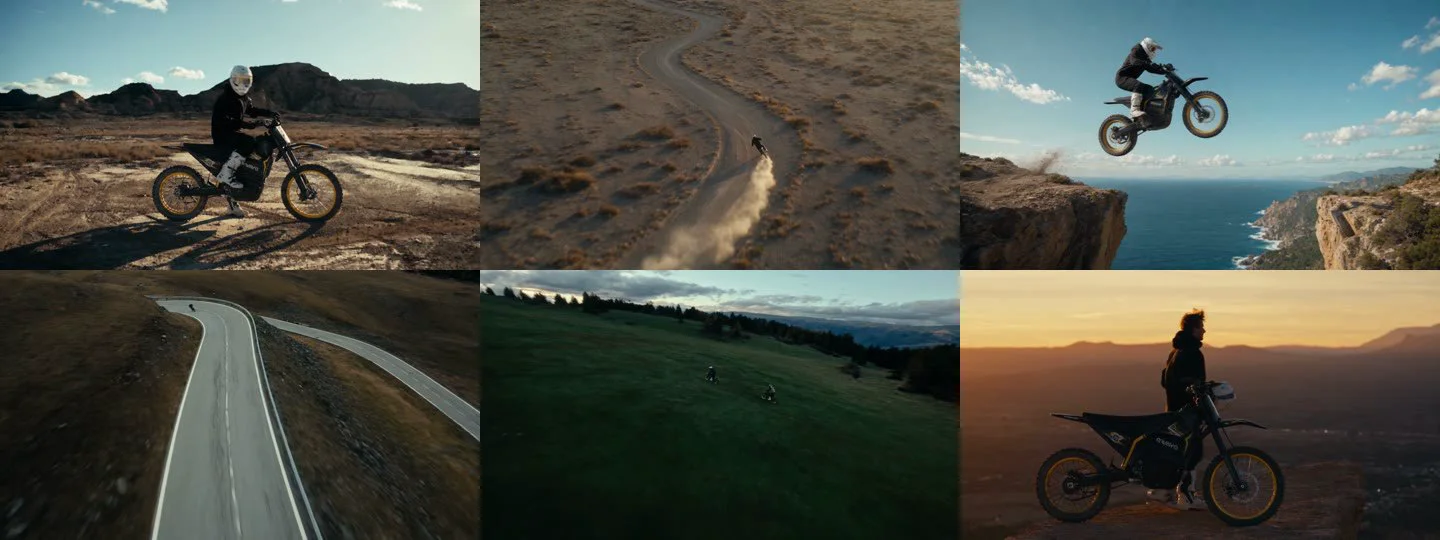
These are finished images. They do not tell us which model or settings produced them. This is an observation exercise, not a reproducible model test.
Revision notes
Note the file, timecode and change you see. After a revision, check the same point again. Keep the earlier version too, so that “we changed it” does not become the only record of what happened.
There is no need to begin with a long sequence. Get two or three shots working together, then extend it. The Shot Continuity Sheet is available to download and fill in.
Record five continuity dimensions
Track identity through facial features, costume and posture; action through the end and start state of adjoining shots; space through eyelines and screen direction; props through their number, position and holding hand; and lighting through direction and time of day.
Prioritise differences that obstruct understanding. A cup changing hands and a slight fabric variation do not necessarily have the same narrative impact.
Make each feedback item traceable
Include the version, shot or timecode, observed problem and intended state. For example, in a hypothetical V03 sequence, someone exits right and enters the next shot from the right: ask whether that reversal is intentional. This locates the issue without overriding the director’s judgement.
Retain short clips on both sides of the cut. Replacing a single still can hide an early action, a late finish or mismatched movement. Compare revisions at the same cut.
Does a fixed seed guarantee continuity?
A seed alone does not establish continuity. It is only part of the generation setup; changes to models, inputs, workflow or action design still require a visual review. The official ComfyUI project documents workflow saving.
Start with three adjacent shots and record each issue and revision. A continuity sheet makes decisions traceable, while playback determines whether the sequence works.
Sources and review date
Sources reviewed on 22 September 2026. Consult the official instructions for installation and version support.